
Make it easy for registrants to join your live session with auto enter. Whether they click a link in a reminder email, log in on the landing page, or register while the session is live, auto-enter helps them get into the room with less friction.
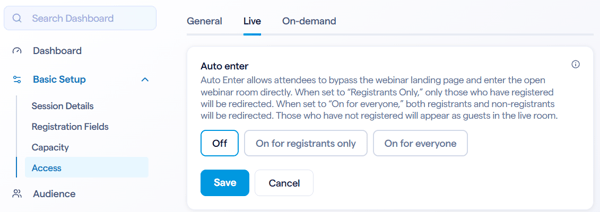
In the session admin head over to Basic Setup > Access and then within the Live tab you'll see the settings for Auto enter. In here you'll see three options:
- Off - Registrants will not enter the live session automatically. If they are registered and go to your landing page, they'll see a button to enter the live session which they have to click in order to enter the room
- On for registrants only - With this chosen registrants will automatically enter the room if they go to the landing page while the session is live. This will happen if only the waiting room is open as well.
- On for everyone - With this chosen everyone who goes to your landing page will enter into the live session. This includes users who are not registered. These users will be prompted to give a name for themselves, but will otherwise be treated as guests.