Note: This feature is available for Enterprise and Event Package plan holders. If interested, please contact our Events Experts at sales@bigmarker.com
Using the classic admin? Click here to learn where you can find the Geo-fencing settings.
Geo-fencing allows you to restrict registration for your event to users from pre-approved geographic regions. If you need to only allow a specific country's residents to be able to enter, or if you need to forbid other regions from joining, Geofencing will help you achieve it.
To find the Geo-fencing settings in the new Session Admin, head over to Privacy & Legal > Geofencing

Visit the list tab to start adding countries and regions to your Geofencing. For each region you will decide if it is allowed or denied. If you set any region to "Allow" then only users from those regions will be able to register.

Geofencing relies on the registrant’s location, as determined by BigMarker to the best of our ability. Registrants who use VPNs or similar tools that conceal their actual location may reduce the effectiveness of geofencing.
Geofencing in the classic admin
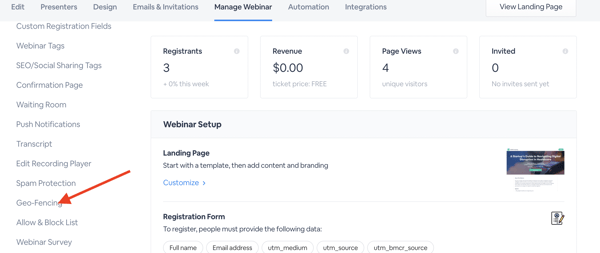
In the webinar dashboard select the Manage Webinar tab. In the left-hand menu below, select Geo-fencing.