For any custom registration field you create, you are able to turn that into an email token. When you use this email token, it will be replaced by the value for that individual registrant. This is a great way to personalize and confirm registration information that the user provided.
You may set up a webinar selector registration field for users to choose a session to attend. You could then use this token to include the session they chose in the body of the email. Or perhaps you are shipping merchandise as part of your registration, you could include any address fields as email tokens so the registrant can confirm they put in the correct information. In any case, these tokens help the attendee satay informed and engaged.
How to Create a Custom Token from a Custom Registration Field
First things first, you will need to create a custom registration field. To review the steps, click here.
In your new field go in to the Settings tab for that field, and click to enable Create token to be used in emails. From here you'll see the same options as described above. A separate text box will populate below to enter in the custom registration field’s email token name.

Note: Only numbers, letters, and underscores are allowed in the token name.
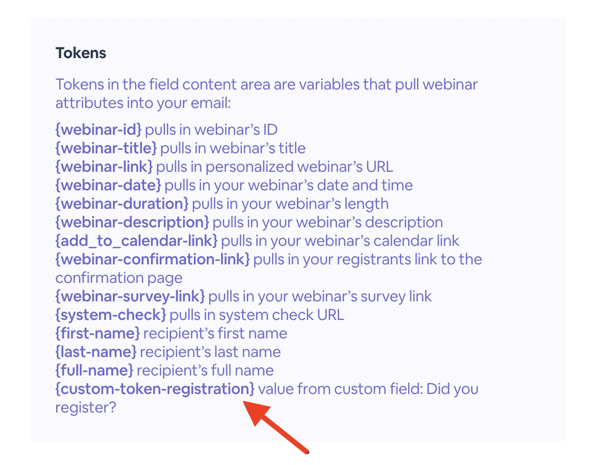
After saving the field, go to your Emails & Invitation page. (Review how to create and customize event emails here). Click on any email, and go to the email’s Email Content. When you scroll to the bottom, your custom token will appear to utilize within your email’s message.
-png.png?width=600&height=466&name=Screen%20Shot%202022-05-19%20at%202-53-26%20PM%20(1)-png.png)
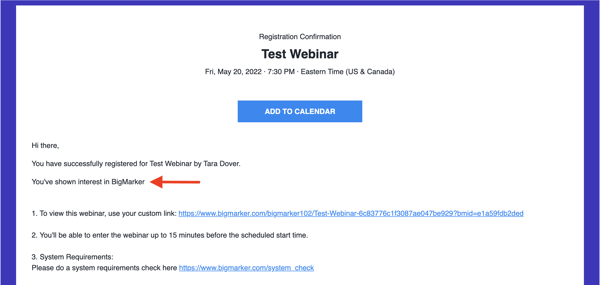
In the screenshot below, there custom registration field titled “Tell us what you are interested in learning about during this event.” The registrant entered, “BigMarker,” and in my email I wrote “You’ve shown interest in {custom-token-interests}.” This is what the registrant received: